• → European Space Agency

      • Space for Europe
      • Space News
      • Space in Images
      • Space in Videos
    • About Us

      • Welcome to ESA
      • DG's News and Views
      • For Member State Delegations
      • Business with ESA
      • ESA Exhibitions
      • ESA Publications
      • Careers at ESA
    • Our Activities

      • Space News
      • Observing the Earth
      • Human Spaceflight
      • Launchers
      • Navigation
      • Space Science
      • Space Engineering
      • Operations
      • Technology
      • Telecommunications & Integrated Applications
    • For Public

    • For Media

      • Media
      • ESA TV
      • Videos for professionals
      • Photos
    • For Educators

    • For Kids

    • ESA

    • Education

    • Teachers' Corner

    • ESA Kids

    • About ESA Education
    • Education programme
    • International collaboration
    • Projects for Teachers
    • European Space Education Resource Office
    • CanSats
    • Hands-on Projects
    • CubeSats
    • Drop Your Thesis!
    • European Student Earth Orbiter
    • European Student Moon Orbiter
    • Fly Your Thesis!
    • Global Educational Network for Satellite Operations
    • Spin Your Thesis!
    • Previous projects
    • Hands-on Collaboration
    • REXUS/BEXUS rocket & balloon experiments
    • GENSO Experimental Orbital Initial Demonstration
    • Previous projects
    • Opportunities
    • Conferences
    • Courses
    • Gaining experience
    • Affiliation programme
    • Subscribe for news

    ESA > Education

    10. Image processing exercise using LEOWorks

    Page1234

    Inspecting an image

    Start LEOWorks 3.0
    Open the file LS7_190_31_09062001_B01.tif

    Band 1, Landsat 7 image of Alban Hills

    To inspect the distribution of the pixel values in the image choose Histogram.


    Histogram for LS7_190_31_09062001_B01.tif

    It is seen that the pixels have values in the range of 62 to 137. The pixel values are visualised in the gray scale image where pixel value 0 is shown as black and pixel value of 255 is shown as white. Therefore the image is gray with little contrast.

    Choose View/Image Values to open a window with the matrix of the pixel values.
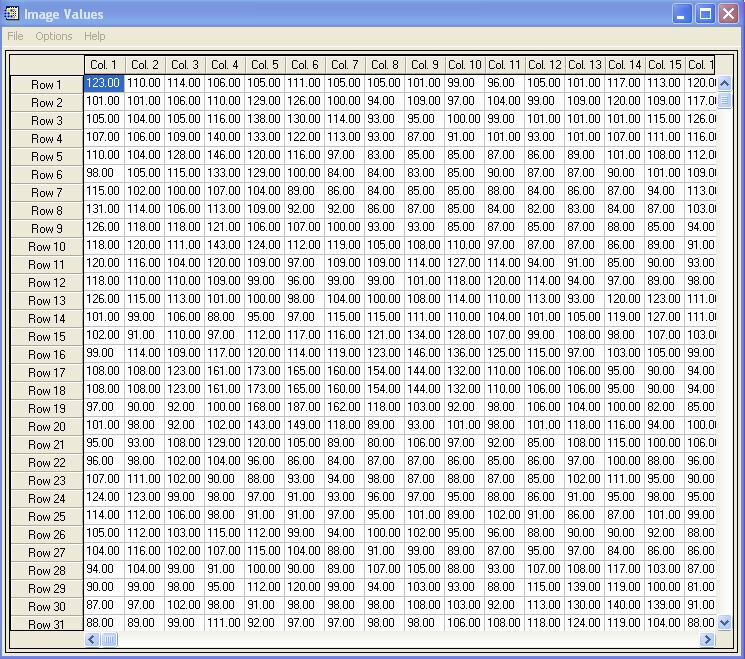
    Matrix showing the pixel values of LS7_190_31_09062001_B01.tif. The area covered is the upper left corner which has pixel values
    Page1234

    Rate this

    Views

    Share

    • Currently 0 out of 5 Stars.
    • 1
    • 2
    • 3
    • 4
    • 5
    Rating: 0/5 (0 votes cast)

    Thank you for rating!

    You have already rated this page, you can only rate it once!

    Your rating has been changed, thanks for rating!

    32
    Tweet
    • Earth observation
      • 1. Introduction
        • 2. Orbit
        • 3. Geostationary orbit
        • 4. Polar orbit
          • 5. Sensors
            • 6. Passive sensors
              • 7. Active sensors
                • 8. Digital image processing
                  • 9. Classroom exercises
                  • 10. Image processing exercise (LEOWorks)
                    • 11. Resources
                    • Download materials
                    • Galicia, Prestige oil spill (573 KB)
                    • Kathmandu (131 KB)
                    • Meteosat 9 (203 KB)
                    • The Nile Delta (251 KB)
                    • Landsat_AH.zip
                      (1.52 MB)
                    • Related links
                    • Eduspace
                    • Observing the Earth
                    • EUMETSAT Image Gallery

    Connect with us

    • RSS
    • Youtube
    • Twitter
    • Flickr
    • G+
    • Facebook
    • Livestream
    • Subscribe
    • App Store
    • LATEST ARTICLES
    • · Earth Explorers take centre stage …
    • · The fast winds of Venus are gettin…
    • · ExoMars 2016 set to complete const…
    • · Herschel ends operations as orbiti…
    • · Europe’s largest spaceship reache…
    • FAQ

    • Jobs at ESA

    • Site Map

    • Contacts

    • Terms and conditions